







Google has officially released Android 17 Beta 3 to Pixel device owners, marking a significant milestone in the development cycle: Platform Stability. This third beta release, arriving exactly four weeks after Beta 2, locks down the API surface and finalizes app-facing behaviors, signaling to developers that it’s time for final compatibility testing before the official launch later this year.
Platform Stability: The Developer Milestone
The Platform Stability milestone is critical for the Android ecosystem. As Google explains in their developer blog, this means “the API surface is locked; you can perform final compatibility testing and push your Android 17-targeted apps to the Play Store.” For developers, this is the green light to ensure their applications will work seamlessly with the final version of Android 17.
“Testing involves installing your production app or a test app using Google Play or other means onto a device or emulator running Android 17 Beta 3,” Google advises. “Work through all your app’s flows and look for functional or UI issues.”
Major New Features in Android 17 Beta 3
Media and Camera Enhancements
Android 17 Beta 3 introduces several significant media-related features:
- Customizable Photo Picker: Developers can now tailor the visual presentation of the photo picker to match their app’s UI. Using the new
PhotoPickerUiCustomizationParamsAPI, apps can modify the grid view aspect ratio from the standard 1:1 square to a 9:16 portrait display. - RAW14 Image Format Support: Professional photography apps can now capture 14-bit per pixel RAW images using the new
ImageFormat.RAW14constant, delivering maximum detail and color depth from compatible sensors. - Vendor-Defined Camera Extensions: Hardware partners can now implement custom camera extension modes like ‘Super Resolution’ or AI-driven enhancements, which developers can query using the
isExtensionSupported(int)API. - Bluetooth LE Audio Hearing Aid Support: Android now includes a specific device category for Bluetooth Low Energy Audio hearing aids (
AudioDeviceInfo.TYPE_BLE_HEARING_AID), allowing apps to distinguish hearing aids from regular headsets. - Granular Audio Routing: Users can now independently manage where specific system sounds are played, choosing to route notifications, ringtones, and alarms to connected hearing aids or the device’s built-in speaker.
- Extended HE-AAC Software Encoder: A new system-provided encoder (
c2.android.xheaac.encoder) supports both low and high bitrates, improving audio quality in low-bandwidth conditions.
Performance and Battery Improvements
- Reduced Wakelocks: Android 17 introduces a new callback-based variant of
AlarmManager.setExactAndAllowWhileIdlethat accepts anOnAlarmListenerinstead of aPendingIntent. This change is particularly beneficial for apps like messaging services that maintain socket connections, as it reduces power consumption by minimizing long partial wakelocks.
Privacy and Security Upgrades
- System-Provided Location Button: Developers can now embed a secure, system-rendered location button directly into their app’s layout using an Android Jetpack library. When tapped, this button grants precise location access for the current session only, without triggering a system dialog.
- Discrete Password Visibility Settings: The “Show passwords” system setting is now split into two distinct user preferences—one for touch-based inputs and another for physical keyboards. Characters entered via physical keyboards are now hidden immediately by default.
- Enforced Read-Only Dynamic Code Loading: To improve security against code injection attacks, Android now requires that dynamically loaded native libraries must be read-only. Apps targeting Android 17 must mark native files as read-only before loading them.
- Post-Quantum Cryptography (PQC) Hybrid APK Signing: Android introduces the v3.2 APK Signature Scheme, which combines classical signatures with ML-DSA signatures to prepare for future quantum computing advancements.
User Experience and System UI
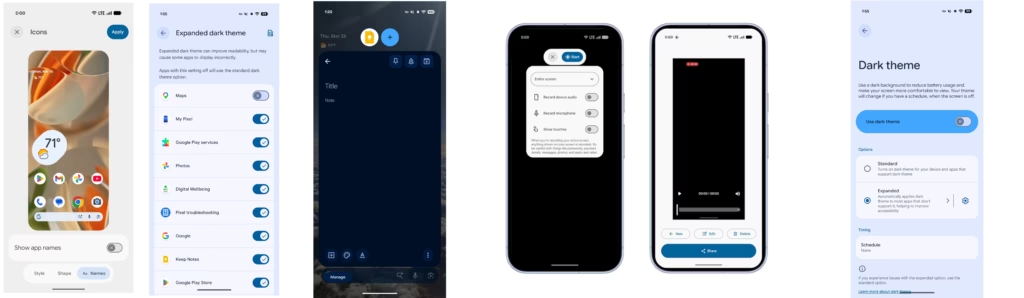
- Hidden App Labels: Android now provides a user setting to hide app names (labels) on the home screen workspace, accessible via system customization settings. Google recommends developers ensure their app icons are distinct and recognizable.
- Desktop Interactive Picture-in-Picture: Unlike traditional PiP, these pinned windows remain interactive while staying always-on-top of other application windows in desktop mode.
- Redesigned Screen Recording Toolbar: A new floating toolbar improves recording controls and capture settings for creators, with the UI automatically excluded from the final video.
- Bubbles Fully Enabled: Following their availability in Android Canary, bubbles for any app are now fully enabled in Beta 3.
- Better Widget Support for External Displays: Improved visual consistency for app widgets when shown on connected or external displays with different pixel densities.
Core Functionality
- VPN App Exclusion Settings: Using the new
ACTION_VPN_APP_EXCLUSION_SETTINGSIntent, apps can launch a system-managed Settings screen where users can select applications to bypass the VPN tunnel. - OpenJDK 25 and 21 API Updates: This update brings extensive features and refinements from OpenJDK 21 and 25, including the latest Unicode support and enhanced SSL support for named groups in TLS.
- Health Connect Device Data Providers: Health Connect can now distinguish between data generated by apps and data originating directly from system-verified hardware like Wear OS watches.
Supported Devices
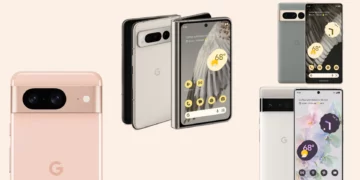
Android 17 Beta 3 system images are available for a wide range of Pixel devices including:
- Pixel 6 series (6, 6 Pro, 6a)
- Pixel 7 series (7, 7 Pro, 7a)
- Pixel 8 series (8, 8 Pro, 8a)
- Pixel 9 series (9, 9 Pro, 9 Pro XL, 9 Pro Fold, 9a)
- Pixel 10 series (10, 10 Pro, 10 Pro XL, 10 Pro Fold)
- Pixel Tablet
- Pixel Fold
Users can easily join the Android Beta Program to receive the update via OTA.
What’s Next
With platform stability achieved, Google is now focused on bug fixes and performance improvements for the final release. Developers should use this time to ensure their apps are fully compatible with Android 17’s new features and behavior changes. The final release is expected in the coming months, bringing these innovations to millions of Android users worldwide.
For developers looking to test their applications, Google recommends reviewing the behavior changes documentation and performing thorough testing across all app flows to identify and resolve any compatibility issues before the official launch.